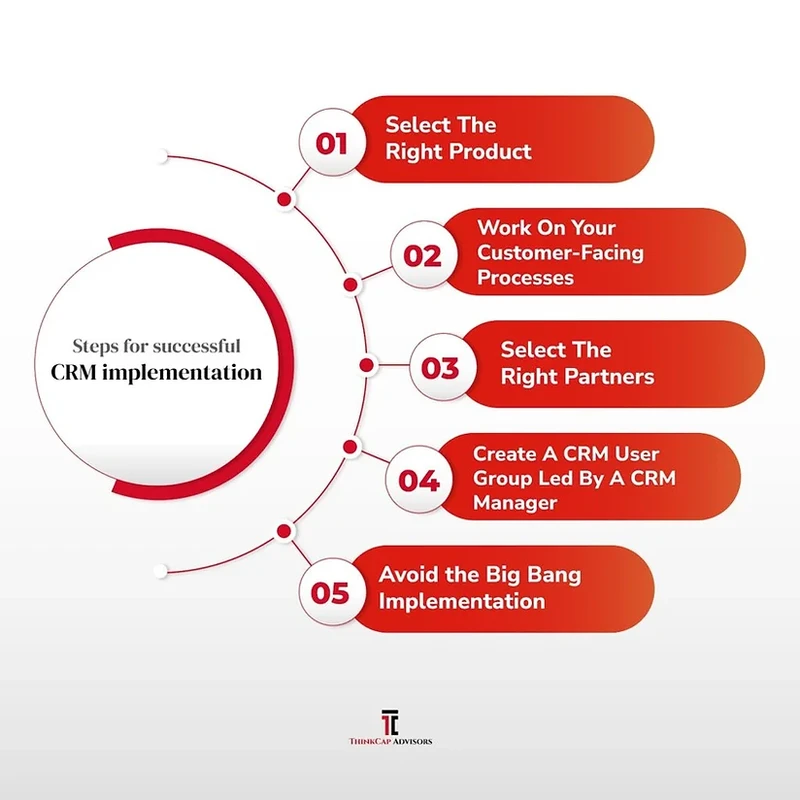
Deploying a new CRM successfully requires aligning business workflows before touching software configuration, validating data across multiple sandbox dry runs, and eliminating daily data entry friction for reps. Following this six-phase methodology ensures your deployment achieves projected pipeline visibility and user adoption while avoiding the 30% to 70% failure rate common in enterprise CRM rollouts.
Define SMART Business Objectives and Team Roles
An enterprise CRM initiative begins with business discovery rather than feature evaluation. According to Digmatix, phase one discovery requires one to three weeks of focused requirements gathering to catalog technical architecture, sales motions, and existing operational gaps. Initiating software configuration before defining operational requirements creates technical debt and misconfigures core pipeline objects.
RevOps leaders must replace ambiguous expectations with specific, measurable, achievable, relevant, and time-bound metrics. Operational benchmarks documented by Itransition show that implementations succeed when tied to explicit targets, such as reducing average sales cycle duration by 20% within six months or raising customer retention by 15%. Specific KPIs provide the technical team with explicit boundaries for data schema customization, stage progression rules, and reporting dashboard layouts.
Digmatix notes that CRM implementations lacking executive backing suffer from reduced resource allocation and lower stakeholder buy-in across commercial teams. Structuring a cross-functional project steering committee distributes ownership across technical and commercial stakeholders:
- Executive Sponsor: Secures capital expenditure, resolves cross-departmental deadlocks, and enforces organizational compliance across executive peers.
- Project Manager: Owns the implementation critical path, coordinates vendor deliverables, and tracks milestone completion schedules.
- Business Analyst: Audits as-is sales motions, translates business requirements into functional workflow specifications, and separates functional needs from non-functional parameters like system latency, single sign-on, and data residency standards.
- CRM Administrator: Manages configuration settings, data schemas, user permissions, sandbox environments, and ongoing production releases.
- Sales Champions: Front-line account executives and sales development reps who validate user interface ergonomics, test stage transitions, and drive peer adoption during release phases.
- Technical Specialists: In larger implementations, this core team expands to include dedicated CRM developers, UI/UX designers, quality assurance engineers, and AI engineers.
Implementation scope, resource commitments, and deployment timelines diverge significantly depending on organizational complexity. The following table contrasts deployment parameters between small businesses and enterprise environments based on operational benchmarks.
Implementation Dimension |
Small Business (SMB) |
Mid-Market to Enterprise |
|---|---|---|
Project Duration |
1 to 3 months |
6 to 12 months or more |
Steering Committee |
CRM Administrator and Sales Manager |
Executive Sponsor, PM, BA, Admins, Developers, QA |
Data Migration Validation |
Single-pass test import into production |
2 to 3 test runs in dedicated non-production sandboxes |
Adoption Mechanics |
Simplified fields and native calendar logging |
Automated voice-to-CRM, email sync, role-specific paths |
Integration Architecture |
Direct webhooks and off-the-shelf connectors |
Bi-directional sync, custom REST APIs, enterprise middleware |
Allocating project resources according to these organizational tiers prevents scope overruns and ensures adequate testing coverage before production cutover. While small teams can deploy through straightforward sprints, enterprise environments require rigorous phased validation.
Map Sales Workflows and Account for Hidden Implementation TCO
Configuring pipeline stages and validation rules before auditing sales workflows codifies existing commercial inefficiencies into the new platform. MO Agency, drawing on insights from over 500 separate CRM implementations, notes that the most challenging aspect of an implementation is designing the business processes the platform must support rather than configuring the software itself.
The difference between those two outcomes almost never comes down to the CRM platform you choose. It comes down to how you implement it.
Platform architecture selection dictates future development agility. Gartner estimates that SaaS solutions represent 70% to 80% of all CRM technology investments, while Forrester reports that 64% of organizations implement CRM specifically for B2B marketing automation and sales force automation (SFA). RevOps leaders must evaluate whether to build upon composable, agentic no-code platforms, such as Creatio, which permit business analysts to adjust pipeline workflows dynamically, or deploy traditional custom-coded platforms that require dedicated developer resources for every schema revision.
Technical leads must also address integration architecture to prevent synchronization failures between the CRM and core systems like ERPs. Direct point-to-point connections create synchronization bottlenecks and race conditions when updates execute simultaneously on the same account record across both systems. Implementing deterministic master-system rules prevents bi-directional sync loops where contact record updates continuously overwrite one another across systems.
Warning: Vendor quotes consistently exclude post-implementation overhead expenses that disrupt operating budgets. Total Cost of Ownership (TCO) modeling must account for four recurring post-launch expenses:
- Sandbox Licensing Tiers: Enterprise-tier development and full-copy staging environments often carry substantial surcharges above base subscription fees.
- API Batch and Rate Overages: High-frequency integration polling between ERP, marketing automation, and customer support platforms can trigger costly monthly API tier upgrades.
- Auxiliary Data and File Storage: Database storage costs scale sharply once email history, proposal attachments, and document logs exceed base quotas.
- Middleware Connectors and Retainers: Third-party integration platform subscriptions and fractional administrator retainers necessary for ongoing schema maintenance.
Audit, Cleanse, and Validate Legacy Data in Sandbox Dry Runs
A robust CRM data migration follows four steps: auditing source data to eliminate redundant fields, cleansing records to standardize formats and remove duplicates, running test migrations 2 to 3 times in a non-production sandbox to verify data integrity, and conducting final verification before production cutover.
Poor data preparation represents one of the primary drivers of user rejection and reporting failure. Digmatix outlines that a structured data migration methodology requires separating the data pipeline into sequential stages to prevent corrupted data from polluting the new environment:
- Data Audit: Inventory every legacy database, custom spreadsheet, and third-party list. Document source schemas, map every field to its target CRM destination property, and flag unpopulated or legacy custom fields for retirement.
- Data Cleansing: Standardize country codes, telephone formatting, and state abbreviations. Strip invalid syntax from email fields and run deduplication scripts matching on corporate domains, email addresses, and tax identifiers.
- Migration Testing: Digmatix recommends executing test migrations 2 to 3 times in an isolated non-production sandbox before live deployment. Each dry run validates relational integrity between parent and child objects, verifies that foreign keys correctly associate opportunities with parent accounts, and validates record count checksums.
- Final Production Cutover: Ingest the fully cleansed datasets into the production instance following the freeze of legacy source systems.
A persistent data remediation challenge involves handling closed-won opportunities belonging to former employees. Purchasing full commercial licenses simply to maintain ownership history on closed transactions inflates recurring software expenditures. Administrators should map inactive sales rep records to deactivated or restricted user profiles within the destination CRM. This practice preserves historical attribution, pipeline reporting, and commission audits without consuming paid user seats.
Cross-system migrations must also maintain regulatory compliance. Data engineering teams must audit legacy databases against active suppression lists to ensure records covered by GDPR or CCPA “Right to be Forgotten” requests are systematically expunged rather than inadvertently restored during migration.
Execute the Cutover Weekend Runbook and Delta Data Sync
Production go-live requires an execution runbook scheduled across a 72-hour weekend window to prevent operational disruptions during active trading hours. While small organizations deploy within 1 to 3 months and enterprise implementations require 6 to 12 months or more of preparation, both must transition production systems within this weekend window to establish an accurate baseline snapshot.
The cutover runbook details exact operational milestones from Friday evening through Monday morning:
- Friday Evening: Legacy System Freeze. Revoke write permissions across legacy databases, CRMs, and integrated web forms. Set legacy instances to read-only mode to prevent mid-migration updates. Extract the baseline data export containing all historical records.
- Saturday Morning: Core Parent Ingestion. Ingest foundational objects—Accounts and Contacts—into the target CRM. Configure data loader tools to use bulk API endpoints to prevent API rate-limit throttling from halting the migration queue.
- Saturday Evening to Sunday: Child Entity Ingestion and Delta Sync. Load child records, including Opportunities, active deals, open tasks, and contract line items. Execute delta synchronization to capture records generated between the final staging export and the Friday freeze, using external ID matching to link child records to parent accounts.
- Sunday Evening to Monday Morning: Verification and Sanity Checks. Verify record counts across all parent and child tables against legacy export logs. Validate workflow automation triggers, confirm single sign-on (SSO) authentication policies, and verify that lead-routing rules function across test submissions.
- Monday Morning: Production Handover. Repoint live web forms and marketing webhooks to the new CRM endpoints. Enable user access profiles, release production credentials, and establish the administrator support war room.
- Hour 0 to 6 (Friday 18:00 – 24:00): Legacy System Freeze. Revoke write permissions across legacy databases, CRMs, and integrated web forms. Set legacy instances to read-only mode to prevent mid-migration updates. Extract the baseline data export containing all historical records.
- Hour 7 to 24 (Saturday 00:00 – 18:00): Core Parent Ingestion. Ingest foundational objects—Accounts and Contacts—into the target CRM. Configure data loader tools to use bulk API endpoints with optimized batch sizes to prevent API rate-limit throttling from halting the migration queue.
- Hour 25 to 48 (Saturday 18:00 – Sunday 18:00): Child Entity Ingestion and Delta Sync. Load child records, including Opportunities, active deals, open tasks, and contract line items. Execute delta synchronization to capture records generated between the final staging export and the Friday evening freeze, using external ID matching to link child records to parent accounts.
- Hour 49 to 66 (Sunday 18:00 – Monday 10:00): Verification and Sanity Checks. Verify record counts across all parent and child tables against legacy export logs. Validate workflow automation triggers, confirm single sign-on (SSO) authentication policies, and verify that lead-routing rules function across test submissions.
- Hour 67 to 72 (Monday 00:00 – 06:00): Production Handover. Repoint live web forms and marketing webhooks to the new CRM endpoints. Enable user access profiles, release production credentials, and establish the administrator support war room.
Shortcut: Set an immutable rollback trigger threshold before beginning the migration window: if unresolved relational errors or data mapping failures persist during validation checks, abort the cutover, re-enable write permissions on the legacy system, and reschedule the migration.
Drive User Adoption by Eliminating Daily Data Entry Friction
CRM adoption fails when systems introduce manual data entry friction and lack leadership reinforcement. Organizations achieve over 90% activity logging by eliminating field bloat, deploying automated voice or email capture tools, and delivering tailored, role-specific training rather than generic feature overviews.
Research from Gartner indicates that 30% to 70% of CRM implementations fail to meet their original objectives, while Meta Group, Inc. reports that 55% to 75% of CRM projects encounter initial failure. These failures stem from operational friction and poor change management rather than software bugs.
Software rarely causes CRM failures. More likely causes of why CRM projects fail are misaligned leadership, weak adoption, and unclear ownership.
Mandating compliance through executive decrees rarely succeeds, leaving commercial teams with activity completion rates near 40%. Conversely, removing manual data entry hurdles drives activity logging rates to 90% and daily login frequencies to 95% or higher, according to operational data from Hey DAN. Automating data capture reduces data entry delays from standard administrative backlogs to same-day execution.
To eliminate daily friction, RevOps teams must adjust operational configurations across three functional areas:
- Cap Required Field Requirements: Restrict mandatory fields at deal stage transitions to essential reporting metrics. Requiring sales reps to populate dozens of speculative fields during early deal stages leads to dummy data inputs and system abandonment.
- Deploy Background Activity Logging: Configure automated background synchronization for emails and calendar events. Deploy voice-to-CRM transcription tools that allow account executives to dictate post-meeting notes from mobile devices directly into standard CRM properties.
- Deliver Role-Specific Training: Replace generic system walkthroughs with scenario-based sessions. Train SDRs strictly on lead qualification and activity sequencing, while training Account Executives on pipeline progression, quote generation, and deal desk collaboration.
Warning: Tracking sales rep compliance through punitive measures like locking compensation to field completion creates bad data. Reps input placeholder text to satisfy software validation rules, degrading pipeline reporting accuracy.
Establish Post-Launch Governance to Prevent Property Sprawl
Without ongoing governance, a newly implemented CRM quickly accumulates redundant custom properties, obsolete automated rules, and inconsistent field values. SingleStone Consulting highlights that maintaining CRM health requires continuous post-launch optimization to sustain operational productivity gains.
RevOps teams must implement a structured governance framework to maintain data hygiene and system integrity:
- Formal Property Intake Protocol: Route all requests for new custom properties through a centralized review process managed by the CRM Administrator. Team leads must document the business requirement, the intended reporting application, and the maintenance plan before any field is created in the production environment.
- Automated Quarterly Field Audits: Run quarterly schema reviews to identify custom properties with population rates below 10%. Deprecate unpopulated custom fields, remove orphan reports, and archive legacy workflow automation rules that no longer trigger active steps.
- Data Freshness and Reassignment SLAs: Establish automated service level agreements (SLAs) for open pipeline records. Program automated notifications for leads uncontacted after 24 hours, and automatically reassign unworked opportunities that linger past defined stage thresholds to prevent pipeline distortion.
- Role-Based Permission Reviews: Audit user access tiers semi-annually. Restrict mass-export capabilities to system administrators and revoke integration API keys assigned to former contractors or retired external applications.
FAQ
How long does a CRM implementation typically take?
Small businesses implementing straightforward pipelines generally complete their deployment within 1 to 3 months. Mid-market and enterprise organizations with complex integrations, legacy database migrations, and cross-departmental workflows typically require 6 to 12 months or more to complete discovery, testing, and production cutover.
Why do 30% to 70% of CRM implementations fail?
According to Gartner and Meta Group, CRM implementation failure rates range from 30% to 70%. These initiatives rarely fail due to software defects; rather, misaligned executive leadership, failure to redesign broken business processes before configuration, poor change management, and user data entry fatigue drive project abandonment.
How many test migrations should be performed before cutover?
Teams should execute 2 to 3 complete test migrations in a dedicated non-production sandbox environment. Running multiple dry runs validates field-mapping transformations, preserves parent-child relational integrity, and verifies that record count checksums match between legacy databases and the destination system before the live cutover.
What is the expected ROI of a successful CRM implementation?
Organizations that streamline sales workflows and achieve high adoption rates can realize an average return on investment of up to 30 to 1, according to SingleStone Consulting. A successful CRM implementation also drives an average 34% increase in sales team productivity through automated activity capture and pipeline visibility.